For hospitals and surgical departments

Your patients,supported beyond the ward

myoncare guides your elective patients through the pathway your team builds once: medical history, consent and risk assessment before they travel in, symptom capture and wound documentation after discharge.

Class IIa medical device (EU MDR) Preparation before admission Follow-up after discharge
What myoncare does

Digital care from referral through to follow-up

myoncare guides your patients through their entire care journey, using the care pathway designed by your team.

Onboarding

Every patient arrives fully prepared

Onboarding runs through a QR code, weeks before the patient travels in. Admissions checks the record instead of collecting it, and the date rests on complete data.

Admission · Ms S., 68

Medical history
Allergien & Kontraindikationen
Procedure consent
PROM baseline
Consents

Complete26 days before the procedure.

Pre-treatment

You see the risk while the plan can still change

Risk assessment is part of the pathway. The patient answers at home, and completed scores reach your dashboard weeks before admission. Anaesthesia and surgery see the result in time to investigate, adapt the approach or move the date.

Risk assessment · Day −21

ASA classificationnormal
Pulmonary risk scorenormal
Cardiac risk scoreflagged
ECG scorenormal

Visible to anaesthesia and surgery,three weeks before the date.

Treatment

Discharge follows documented criteria

The stay follows the pathway your team built, so the discharge decision rests on recorded values rather than an impression. Follow-up starts on the day of discharge. This is how myoncare supports enhanced recovery protocols.

Discharge criteria · Day +5

Master data received via HL7
Pain assessment documented
QoR-15 recorded
Mobilisation achieved

Discharge ondocumented criteria.

Post-treatment & follow-up

After discharge the patient stays visible

If a value crosses your threshold, the team is notified in real time. What stands out can be resolved on an outpatient basis, and the course is documented for quality assurance or a registry.

Follow-up · Day +12

Wound documentationPhoto received
Pain scoreabove threshold
Physio exercisesflagged
PROM follow-upruns to day 90

Care team notifiedthe same day.

Software for your team

Your surgical standard, applied to every patient

Your team assembles the sequence for one procedure type once – consent, medical history, risk scores, preparation, follow-up. Every patient with that indication then runs through it.

myoncare Careplan Manager: the "Total knee replacement – follow-up" care pathway, whose assessment branches into three different monitoring questionnaires depending on the result.
01

Your protocol as a pathway

Consent, medical history, risk scores, prehabilitation and follow-up are combined into one pathway in the no-code editor – no developers, straight in the browser.

02

At-risk patients take a different route

A flagged score leads into closer monitoring, a normal one into the standard route. The protocol adapts to the patient’s needs.

03

Your surgical schedule at a glance

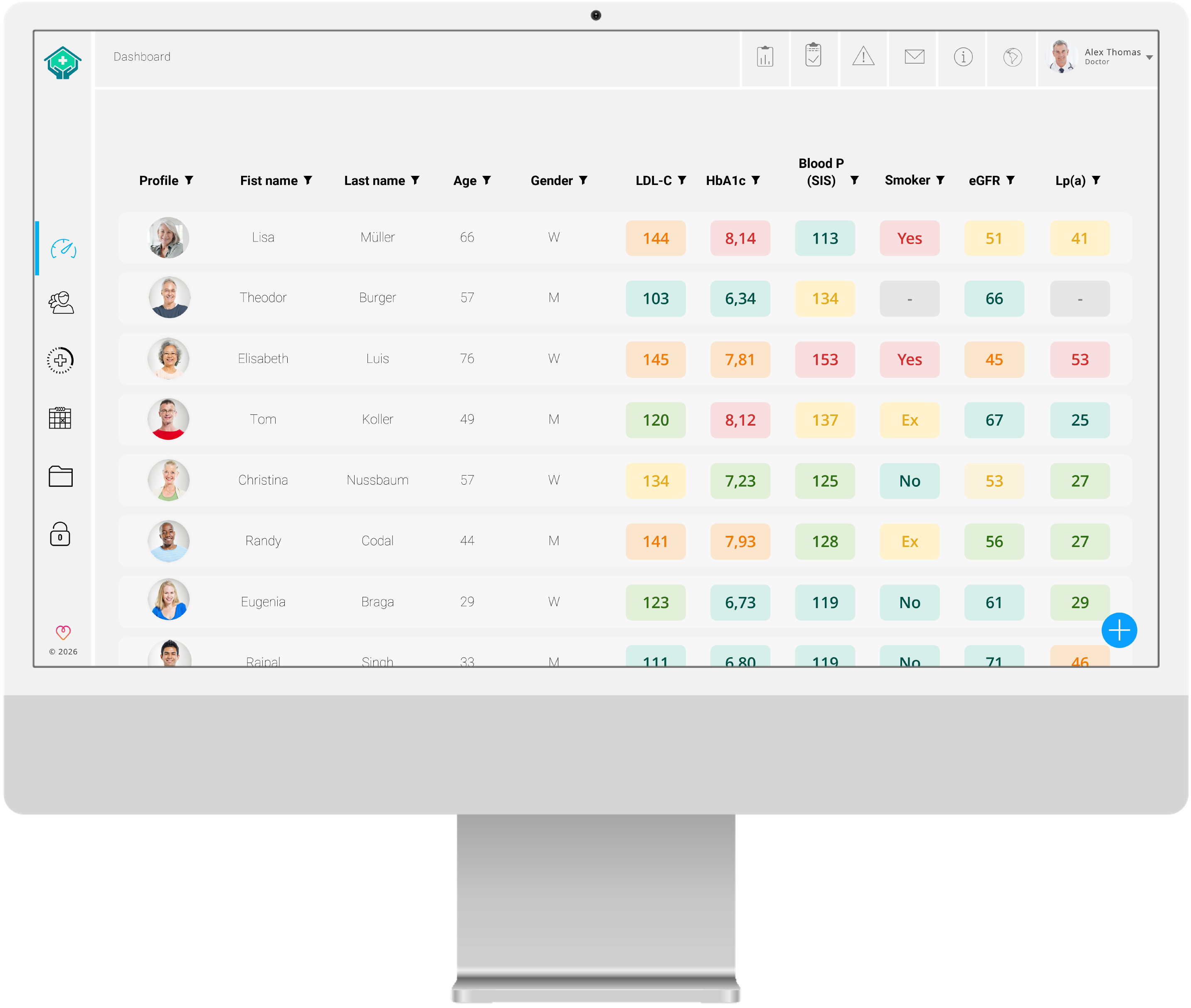
Every patient is displayed on one dashboard, filterable by your criteria. The cases that need attention are flagged in red.

04

Data for quality assurance and registries

Baseline and follow-up data arise in routine care and are available as an export. Roles and sites mirror your own structure.

Patient App

Everything about the procedure in one place

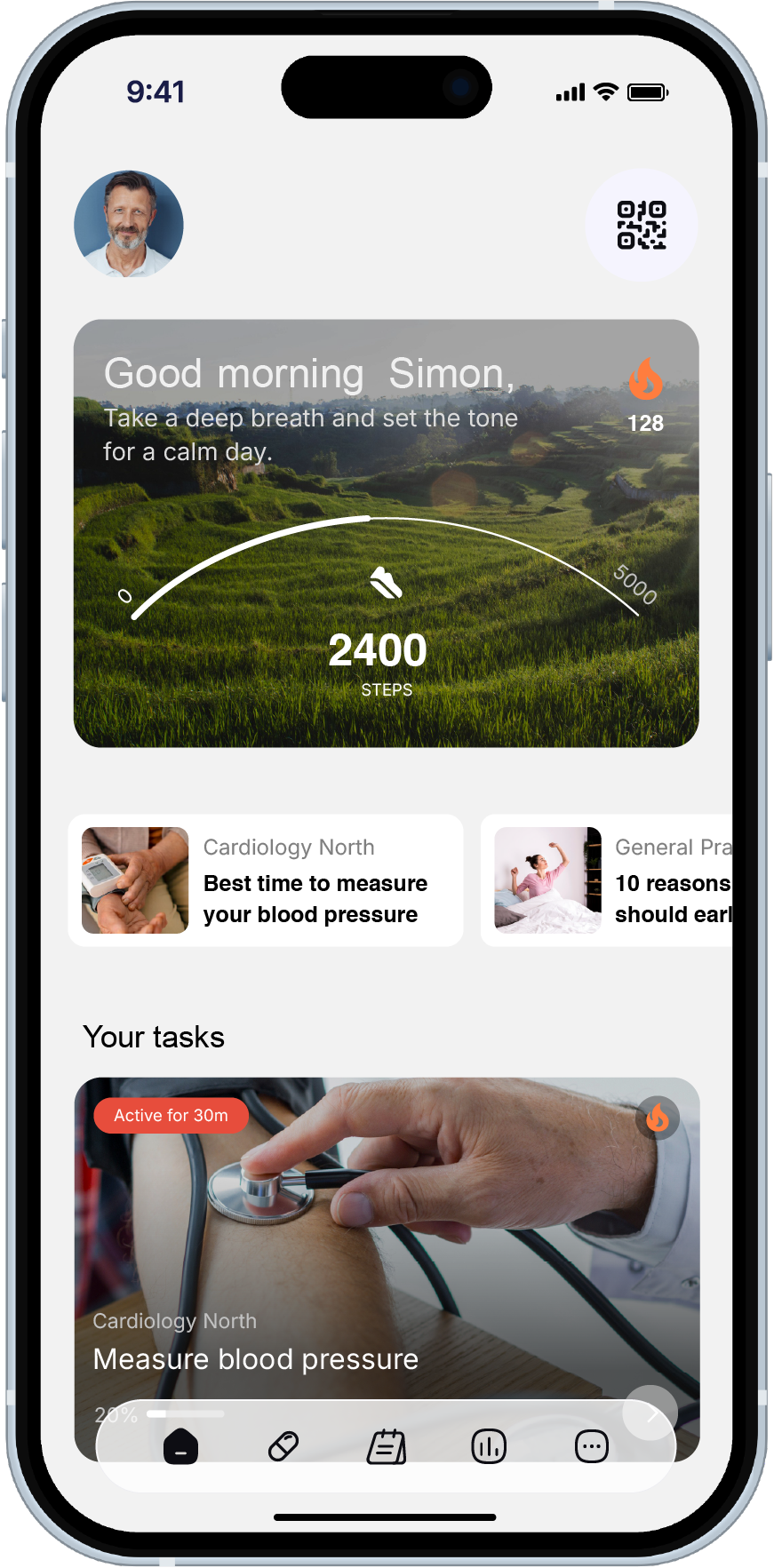
Consent, directions, preparation, exercises, wound checks: everything the patient needs around their procedure sits in one place, each item at the moment it is needed. Their Caretask answers arrive structured in your backend, and anything unclear is settled by message or a short video call.

myoncare Patient App: home screen with a welcome message, news and the open Caretasks for the day.
One patient journey

From referral through to follow-up

Three phases, six stations. myoncare contacts your team only when it is necessary.

Ms S., 68
elective total knee replacement, German G-DRG I43B
Referred by a community orthopaedic practice

Pre-treatment Treatment Post-Therapie &follow-up
Day −28Referrer
Day −21System
Day 0Hospital
Day +5Ward
Day +12System
Day +90Outcome
  1. Day −28· Referrer

    The pathway starts at the community orthopaedic practice

    With QR-code onboarding. History, HOOS/KOOS and baseline PROMs are complete before the first hospital appointment.

  2. Day −21· System

    A risk found in time

    Her cardiac risk score comes back flagged three weeks out. The work-up is arranged while there is still room to act, instead of surfacing at the pre-operative check on the day.

  3. Day 0· Hospital

    The procedure goes ahead as planned

    Consent read, exercises completed, paperwork complete, risk profile known. The theatre list holds because nothing is missing.

  4. Day +5· Ward

    Discharge against fixed criteria

    QoR-15 and the pain assessment are documented, the discharge criteria met. Follow-up in the pathway continues automatically from the day of discharge.

  5. Day +12· System

    The complication that stayed outpatient

    Her pain score crosses the threshold your team set. The team is notified and brings her in. Twenty minutes outpatient, where a readmission would have meant days on a ward.

  6. Day +90· Outcome

    The outcome is on record

    PROM follow-up continues. Baseline and course are available for quality assurance, registries and benchmarking within your peer group.

Let's talk

Rollout & operation

Built to grow with
your organisation

Four points that decide it in practice –
for IT, data protection and executive management.

Rollout without replacing systems

myoncare connects to your existing PVS or KIS via HL7 and FHIR. Where an HL7 interface to the HIS exists, master data for new patients transfers automatically. Manual entry falls away.

Your structure, as it actually is

Sites, departments, specialties and partner practices map to locations and satellites, with permissions assigned centrally by user role. External partners see only their own patients.

The evidence procurement asks for

EU MDR Class IIa, FDA listing, GDPR and ISO/IEC, all in place and regularly audited. That speeds up procurement, and only a Class IIa device may support clinical decisions.

Grows with your organisation

myoncare runs in several European markets and in the US, with new localisations added continuously. A second site, or another country, needs no second system.

Any indication

For every planned procedure
you perform

Peri-interventional care pathways are in use in, among others:

OrthopaedicsVisceral surgeryUrologyGynaecologyRadiotherapyImplantologyOrthopaedicsVisceral surgery
Knee replacementHip replacementColorectal resectionRectal resectionBreast surgeryProstatectomyDental implantationKnee replacementHip replacementColorectal resection
Certification & integration

Cleared for routine clinical care

Here is the evidence your IT, data protection and procurement teams will want to see.

Trusted by

Good to know

Your questions, answered

myoncare is a CE-marked health platform consisting of a web app & desktop app for careteams for clinical teams and a smartphone or web app for patients. Digital content can be created in the backend and then sent to patients in the smartphone app. From their dashboard, clinical teams can manage their patients, filter by a range of criteria, track health and communicate with patients directly, by video call or chat.

With myoncare you can easily create digital care pathways that give your patients additional support along their health journey. myoncare can help to encourage adherence, identify risks and complications early, capture health data in structured form, reduce uncertainty for patients and improve satisfaction. The dashboard gives you a clear overview of your patients, lets you filter by a range of criteria, and lets you interact with them directly by chat, video call or data transfer.

myoncare can support doctors and patients across all indications. The only exception[DM1.1] is conditions that make using a smartphone impossible and the use within critical care. Digital content can also be created to support patients taking medicines or using medical devices, or to provide insured members or employees with preventive content. The range of possibilities is very wide.

The content management system is the heart of myoncare. Content can be created in the CMS, given automation rules and combined into care pathways. The CMS interface has been designed to be intuitive, so that it can also be used easily by people without programming knowledge.

If you do not have the time or the inclination to create content yourself, you can refer your patients into an existing health program run by our subsidiary [DM2.1][TH2.2]myon.clinic. This lets you offer your patients extensive digital support with minimal effort on your side. Alternatively, you can draw on the services of our content team, which can support you in creating individual content. Please get in touch for more information.

Classifying our platform as a Class IIa medical device brings a number of advantages, both for us as the manufacturer and for you as the user. For you it means added safety, because myoncare is developed and continuously improved in line with the latest quality and safety standards. This is assured by regular audits by TÜV SÜD Product Service GmbH. Classification as a Class IIa medical device is also a basic prerequisite for digital health applications to be used for monitoring and diagnostic support. Successful Class IIa certification does, however, require considerable financial and staffing investment.

In Germany, the billing components of our distributor myon.clinic make additional reimbursement via GOÄ or IGeL possible. Billing runs automatically through our service providers, with no effort on your side; your existing revenue is unaffected. This is only possible through the use of a medical device certified to MDR Class IIa.

As of September 2026: Using myoncare requires Windows 11 (or later), macOS 15.06 (or later) or Ubuntu 22.04 (or later), a stable internet connection of at least 10 Mbit/s with a maximum latency of 200 ms, and the latest version of the Chrome or Firefox browser. To use it on a tablet you need at least iOS 18.3.1 or Android 13.0. Your instance is hosted on an EU server of a company validated by us — with nothing for you to do. Your patients need a smartphone with an internet connection and at least iOS 18.3.1 or Android 13.0. Setting up interfaces to a hospital information system or other systems involves additional effort and cost.[

See the pathwayon one of your own procedures

A live demo using an example from your own hospital – case volume, tariff and workflow exactly as they are for you.

Let's talk